VistaSoft Monitor

Manual
© 2022-2025 DÜRR DENTAL SE
2506V010
Manual
© 2022-2025 DÜRR DENTAL SE
Este manual se aplica para VistaSoft Monitor, a partir de 06/2025.
Este manual forma parte del software. Responde a la ejecución del software y refleja el estado de la técnica en el momento de su primer lanzamiento al mercado.

Ante la no observación de las instrucciones y advertencias de este manual, ni el fabricante ni el distribuidor asumirán responsabilidad ni garantía alguna en relación a la seguridad de funcionamiento del aparato ni del software.
El manual alemán es el original. El resto de idiomas son traducciones de las instrucciones originales.
Las indicaciones de advertencia expuestas en esta documentación advierten de posibles riesgos de daños personales y materiales.
Se han señalizado con los siguientes símbolos de advertencia:

Símbolo de advertencia general
Las indicaciones de advertencia están estructuradas de la siguiente manera:

Descripción y tipo de la fuente de peligro
Aquí se indican las posibles consecuencias en caso de no observar la indicación de advertencia
Prestar atención a estas medidas para evitar el peligro.
PELIGRO
Peligro inminente de lesiones graves o de muerte
ADVERTENCIA
Peligro posible de lesiones graves o de muerte
PRECAUCIÓN
Peligro de sufrir lesiones leves
ATENCIÓN
Peligro de importantes daños materiales
En este documento y en el software se utilizan los símbolos siguientes:
Nota, por ejemplo, indicaciones especiales sobre un empleo económico del aparato.

Tenga en cuenta la documentación electrónica adjunta.

Fabricante
Todos los elementos de circuito, procesos, denominaciones, programas de software y aparatos indicados en este manual gozan de protección de la propiedad intelectual.
La reimpresión de estas instrucciones para el montaje y uso, también parcial, está únicamente autorizada tras haber obtenido antes la autorización explícita y por escrito por parte del propietario de los derechos de autoría.
El software sirve para visualizar, configurar y analizar informaciones de los aparatos propios del fabricante y de su gestión de mantenimiento.
Este software se emplea para controlar los dispositivos propios del fabricante desde el ordenador.
El software tiene las siguientes funciones:Recolectar, analizar, señalar y documentar mensajes y situaciones de fallo en tiempo real
mostrar datos técnicos y magnitudes físicas
Apoyo del mantenimiento
documentar el funcionamiento
Adaptar las configuraciones de los dispositivos
Archivar datos en una nube
El dentista puede poner a la disposición los datos a terceros (al socio comercial y de servicio) mediante una interfaz, siempre y cuando se cuente con la autorización explícita.
El software prepara la función del módulo de visualización para el control del separador de amalgama. No obstante, no sustituirá el módulo de visualización.
Todo tipo de empleo, que difiera de lo anteriormente indicado, no será considerado como una utilización conforme al uso previsto. El fabricante no asumirá ninguna responsabilidad por los daños que se puedan derivar del mismo. El usuario correrá con todo el riesgo.
Al operar con este software se tienen que observar las directrices, leyes y disposiciones vigentes en el lugar de empleo.
No modificar el software.
Observar las Instrucciones de instalación y el manual del software.
Es preciso instruir o encargar la instrucción de los usuarios en el manejo del software.
El software se instalará en un ordenador en la red IT local y se enlazará con una aplicación en la nube.
Por ello, es necesario considerar el Security Context, una responsabilidad compartida por el fabricante y el explotador en relación a la seguridad cibernética.
Capacitar a los empleados en el sector de seguridad y de protección de datos.
Designar a un encargado de protección de datos.
Designar a un gestor de riesgos IT medicinal.
Se recomienda aplicar la norma IEC 80001-1 para administrar los riesgos de seguridad para redes IT medicinales.
La configuración de una red IT medicinal requiere de conocimientos especializado de un administrador de redes.
Las siguientes modificaciones en una red IT medicinal pueden causar nuevos riesgos de seguridad que requieren de una reevaluación del análisis de riesgos:Modificaciones de la configuración de la red IT
Adición de componentes (hardware o software) a la red IT medicinal
Eliminación de componentes de la red IT medicinal
Actualizar o modernizar componentes en la red IT medicinal
Indicar cualquier suceso en el sector de seguridad cibernética al fabricante bajo
incidents@duerrdental.com.El operador debe tomar las siguientes medidas técnicas para utilizar el software de una manera segura:
Proteger la red IT de la clínica con un firewall o un antivirus.
Desactivar servicios, aplicaciones y protocolos de red innecesarios o inseguros.
En caso de ser posible, utilizar la red conectada por cable.
Prestar atención a los avisos de posibles infecciones de virus y, en caso necesario, comprobar con el software antivirus y eliminar el virus.
Mantener el software usado actualizado, especialmente el sistema operativo, el firewall y el antivirus.
Asegurarse de que solamente se descargan contenidos de confianza. Instalar solamente actualizaciones de software y firmware de fabricantes autentificados.
Comprobar con regularidad la integridad del software o del firmware.
Comprobar los requerimientos del sistema antes de cada instalación.
Segmentar la red IT de la clínica siempre que de sentido.
Utilizar la autentificación y ‑autorización adecuada del usuario del sistema operativo. Asignar los derechos únicamente a cuentas de usuario que realmente se necesitan.
Limitar los roles de administrador a un número limitado de cuentas.
Utilizar la administración del usuario que ofrecen el software o los aparatos medicinales.
Utilizar los requerimientos para contraseñas generalmente reconocidos.
Encriptar los datos que contengan datos personales.
Efectuar una protección de datos regular.
Comprobar medios externos de memoria (p.ej. Memorias USB, tarjetas de memoria) antes de conectarlos a la red medicinal.
Limitar el acceso al internet a un mínimo.
Comprobar si hay algún contenido dañino en emails y en anexos.
Proteger el hardware contra un acceso no autorizado (red IT, servidor y aparatos conectados).
 | Informaciones adicionales, véase también en "Whitepaper seguridad cibernética". |
El software se encuentra instalado en un ordenador en la red de la clínica local y está enlazada con los dispositivos de Dürr Dental en esta.
En caso de surgir un mensaje en uno de los dispositivos en la clínica, el software transmite el mensaje a la nube (vistasoftmonitor.com). Adicionalmente, se visualiza un mensaje del notificador VS Monitor en la regleta de tareas.
Es posible visualizar el estado actual, así como manteniimientos pendientes mediante un navegador.
Opcionalmente, es posible asignar los aparatos a un socio de servicio. El socio de servicio obtendrá automáticamente los aparatos y las clínicas que le han sido asignados.
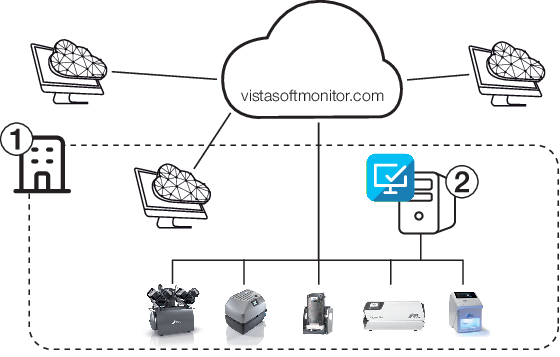
Todos los aparatos compatibles, propios del fabricante y capaces de funcionar en una red, pueden ser conectados al software.
Vista general de los aparatos apoyados, véase www.duerrdental.com/en/vistasoftmonitor/.
Dispositivos sin conexión a la red pueden ser conectados al software mediante la Connect Box.
Requerimientos para la instalación de la servidora del software VistaSoft Monitor en una servidora o en el ordenador con la red de la clínica:
Sistema operativo: | Microsoft Windows 10 (a partir de la versión 1809) Microsoft Windows 11 Microsoft Windows Server 2019 Microsoft Windows Server 2022 Microsoft Windows Server 2025 |
Tarjeta gráfica: | Resolución ³ 1280 x 1024 (recomendad) |
Interfaz: | Ethernet, asignación DHCP/dinámica de direcciones IP Internet |
Puertos necesarios: | TCP: 502, 512, 514, 50123, 25565 UDP: 1900, 45123, 45124, 45125 |
Software adicional necesario: | Navegador (Mozilla Firefox, Google Chrome o Microsoft Edge, siempre en la versión actual) Para conexión de escáneres de placas radiográficas: instalación de VistaSoft para servidor o para puesto individual (a partir de la versión 3.0.20) en el mismo ordenador |
Periféricos necesarios: | Se recomienda una reproducción de sonido (tarjeta de sonido, altavoces) |
Para la superficie de usuario de la nube se requiere un solo navegador.
La conexión a la red de los aparatos debe ser permanente, p.ej. mediante LAN o mediante un WLAN funcional.
El software del servidor se instala en un ordenador en una red local. Este ordenador sirve como interfaz con la nube y requiere de un acceso de internet.
Tener en cuenta en caso de un software de servidor:Instalar el software del servidor en un ordenador que funcione de manera permanente.
Recomendación: Servidor de la red de la clínica. En caso de no ser posible: ordenador arbitrario, p.ej. Ordenador de recepción
El software del servidor se utiliza en un solo ordenador en una red local
VistaSoft Monitor No es compatible con Tyscor Pulse. Desinstalar Tyscor Pulse.
Software de visualización VistaSoft (a partir de la versión 3.0.20) instalado en el mismo ordenador como servidor.
Durante el primer arranque de VistaSoft se descarga e instala automáticamente VistaSoft Monitor. En caso de no constar una conexión de internet, es posible descargar e instalar el software en un momento posterior.
Si se instalaron los programas VistaSoft (a partir de la versión 3.0.20) y VistaSoft Monitor conjuntamente, no es necesaria una instalación adicional de VistaSoft Monitor en la red de la clínica.
El software solo se puede instalar y poner en marcha por parte de personal experto debidamente formado.
Después de la instalación, se visualiza el notificador en la regleta de tareas como símbolo.

A continuación se configura VistaSoft Monitor en el ordenador, usando la instalación del servidor, véase Registrar la cuenta de la clínica.
Algunas clínicas utilizan un proxy para controlar el acceso al internet.
En este caso deben configurarse las configuraciones de proxy para poder conectar el VS Monitor Legacy Connector (LC) con la nube.
en el escritorio para reiniciar el programa VS Monitor Notifier.Durante el primer registro de un usuario en el ordenador con la instalación del servidor de VistaSoft Monitor se asignarán automáticamente todos los aparatos que se encuentran en la red a este usuario.
A continuación, el usuario podrá registrarse desde cualquier aparato a la plataforma de usuario para controlar sus aparatos.
Notifier.oPulsar Start > Dürr Dental VS Monitor > VS Monitor Notifier.Se enviará un enlace de activación por email para confirmar la cuenta del usuario.
Durante la licenciación de VistaSoft se genera automáticamente una cuenta de usuario y se envía un email con el enlace de activación.
La superficie del usuario de la nube se abre en el navegador.
Clínica:
Acceso a aparatos en la clínica, necesario para el uso de VS Monitor
Socio de servicio:
Acceso opcional a la clínica por parte de socios de servicio registrados
A continuación se describe la configuración en la clínica.
Informaciones acerca del socio de servicio véase VistaSoft Monitor para socio de servicio
Ordenador en la red local con instalación en el servidor de VistaSoft Monitor
Cuenta del usuario (cuenta de la clínica) en vistasoftmonitor.com (véase también Registrar la cuenta de la clínica).
en la barra de tareas.oPulsar Start > Dürr Dental VS Monitor > VS Monitor Notifier.En el navegador se abre la pantalla de VistaSoft Monitor.
Para configurar VistaSoft Monitor, es necesario realizar los siguientes pasos:
Durante la instalación se genera automáticamente el lugar de instalación principal  .
.
Recomendamos asignar como lugar de instalación principal un nombre respectivo, p.ej. "Clínica dental Dr. Sánchez".
El lugar de instalación principal también puede ser subdividido en otros lugares de instalación, véase Administrar lugares de instalación. De esa manera es posible una vista general sencilla de los aparatos en los diferentes lugares de instalación en organizaciones mayores.
 Ajustes.
Se abre el cuadro de diálogo.
Miembros son usuarios que tienen acceso a la organización en el monitor VS. Solo es posible añadir a un usuario al lugar principal.
Hay diferentes roles con distintos derechos de acceso:
Función | Derechos de acceso |
|---|---|
Miembro | Consultar la información del aparato |
Administrador | Administrar lugares de instalación Administrar miembros Administrar los aparatos Configurar los parámetros de los aparatos |
Ajustes.Se visualizan los lugares de instalación existentes.
El nuevo miembro obtendrá una invitación por email que incluye el acceso a la superficie del usuario.
 junto al miembro.
 Cambiar rol. junto al miembro.
 Borrar.
Si en un aparato se visualiza un mensaje importante (fallo), el software informa automáticamente a los contactos registrados en Notificaciones.
Notificaciones pueden registrarse en todos los niveles de la organización. En caso de visualizar un contacto de notificación de color gris, el contacto de notificación está registrado en un lugar de orden superior.
Ajustes.Se visualizan los lugares de instalación existentes.
Se envía un primer email. Confirmar las notificaciones del VS Monitor mediante el enlace enviado al email.
junto al registro. Borrar.Cada dispositivo es asignado automáticamente a la lista de dispositivos y asignado primero al lugar de instalación principal. En caso de haber fijado otros lugares, es posible asignar el dispositivo a otro lugar.
Se abre la lista de dispositivos. Se han asignado nuevos aparatos al lugar de instalación principal.
Es posible asignar un socio de control a cada dispositivo. El socio de control poda ver las informaciones del aparato y realizar ajustes.
En la lista de aparatos en el panel de control se encuentran aparatos controlados por un socio de servicio, identificado con  .
.
Contactar con el socio de control, antes de asignar el aparato a un socio de control. El socio de control puede cobrar ciertos honorarios.
Solo es posible seleccionar socios de control registrados en VS Monitor.
Se muestran los detalles del aparato.
El aparato se registra en la cuenta del socio de servicio, conjuntamente con la clínica.
El socio de servicio obtendrá una notificación acerca del nuevo aparato en su  Bandeja de entrada.
En caso de separadores de amalgama, es posible encargar automáticamente a empresas la eliminación y la entrega del recipiente de recolección de amalgama, usando la función WasteWatch.
Si el recipiente de recolección de amalgama está lleno en un 95% y es necesario cambiarlo, el sistema enviará una notificación a las empresas registradas. La notificación contiene las informaciones de contacto e informaciones básicas del dispositivo.
Se muestran los detalles del aparato.
El sistema enviará un email con enlace de activación a la empresa. La empresa tendrá 30 días para confirmar la consulta, pulsando en el enlace de activación.
Se visualizará el estado, dependiendo de la reacción de la empresa:En espera: La consulta todavía no ha sido confirmada.
Registrado: La empresa confirmó la consulta. La función de notificación está activa.
Registrado: La empresa rechazó la consulta.
Caducada: La empresa no respondió en el lapso de 30 días.
Es posible enviar una nueva solicitud.
En tanto que ambas empresas (empresa de eliminación y proveedor) no presentan el estado Registrado, se visualizará el estado Inactivo de WasteWatch.
Una vez que ambas empresas presenten el estado Registrado, la función WasteWatch está en modo activo y se enviarán las notificaciones.
Las vistas y derechos dependen del rol seleccionado (Usuario o Administrador) y el miembro (clínica o socio de servicio).
Ver también VistaSoft Monitor para socio de servicio.
En el ordenador en la red local, en la que se encuentra instalado el software, el notificador VS Monitor funciona en el fondo.
El notificador tiene dos funciones:Visualizar las notificaciones de escritorio en el ordenador.
Establecer una conexión entre los aparatos y la nube
Al cerrar la interfaz del usuario en el navegador, no se finaliza el software en el ordenador. El software permanece activo, el notificador sigue indicando el estado en la barra de tareas.
Para volver a abrir la superficie de usuario, hacer clic en el símbolo de la barra de tareas.
Se visualizará el notificador en la regleta de tareas como símbolo.
En caso de surgir un nuevo mensaje acerca de un aparato, el programa VistaSoft Monitor envía la información a la nube. El notificador indica un nuevo mensaje en la barra de tareas y como información de Windows.
La duración de visualización de las notificaciones puede ampliarse mediante ajustes de Windows a un máximo de 5 min.
El símbolo del programa del notificador en la barra de tareas visualiza el máximo nivel de mensajes actual de los dispositivos.
 | Funcionamiento correcto (no hay aviso) |
 | Avería |
 | Atención |
 | Observación |
 | La conexión con los dispositivos está interrumpida |
Mediante el menú de contexto en la barra de tareas (tecla derecha del ratón en el símbolo de programa) se puede finalizar el notificador o separar la conexión con la nube:
Desactivar notificaciones de escritorio | Se desactivan las notificaciones en el escritorio. La conexión entre los aparatos y la nube permanece. Ver también Notificaciones del notificador |
Separar la conexión de la nube | Se separó la conexión con la nube. No se transmitirán informaciones ni mensajes del dispositivo a la nube. |
Acceder al VS Monitor | La superficie del usuario de la nube se abre en el navegador. |
Licencia | Se visualizarán las indicaciones adicionales acerca de la licencia. |
en la barra de tareas y seleccionar Desactivar notificaciones de escritorio en el menú contextual.Se accede a la superficie de usuario de la nube.
Si se separa la conexión con el notificador de la nube, no se transmitirán informaciones del aparato o mensajes a la nube.
en la barra de tareas y seleccionar Separar la conexión de la nube en el menú contextual.Se accede a la superficie de usuario de la nube.
Existen dos maneras para acceder a la interfaz del usuario:
.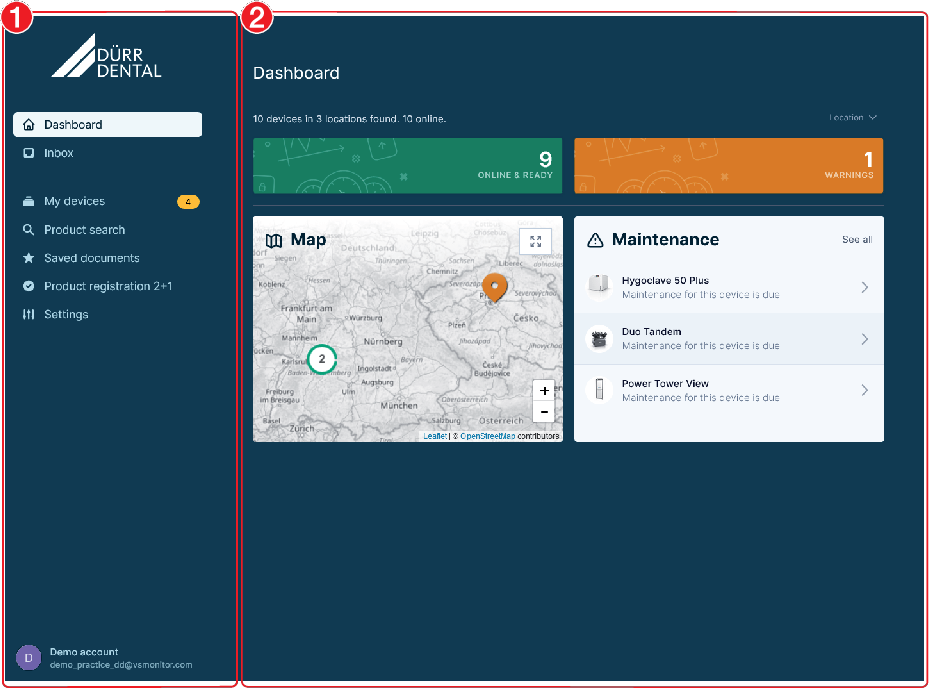
La superficie del operador de la nube consiste de la barra de navegación y el contenido.
La zona de contenido depende de la vista seleccionada en la barra de navegación.
En la barra de navegación pueden seleccionarse diferentes visualizaciones, dependiendo del rol del usuario registrado:
 | Panel de control | Página inicial, vista general del estado de los aparatos y de los lugares El sector Mantenimientos solo se visualiza si hay algún mantenimiento pendiente. |
| Entrada de correo | Indicaciones para la clínica:
|
 | Mis dispositivos | Presenta informaciones de todos los dispositivos existentes en la red local. En caso de que algún aparato esté en estado Fallo, Atención o Aviso, se visualiza la cantidad de estos aparatos en la barra de navegación. El color asignado indica el máximo nivel de mensaje surgido. Ver también Mis dispositivos |
 | Búsqueda de productos | Búsqueda de informaciones acerca de productos de Dürr Dental a partir del número de serie, del nombre del producto o del número de pedido. Mediante la aplicación se puede escanear también la placa de características para facilitar la búsqueda. |
 | Documentos archivados | Documentos marcados como favoritos |
 | Registro del producto 2+1 | Registrar un nuevo dispositivo en Dürr Dental, para solicitar una prolongación de la garantía. |
| Configuración | Crear y editar lugares de instalación, usuarios y notificaciones |
Al momento del primer registro en la nube, el navegador ofrece aceptar notificaciones de esta página web. Con ello se visualizarán notificaciones de escritorio en VS Monitor, si el navegador está activado en este ordenador. No es necesario tener abierta la página web de VS Monitor.
Las notificaciones pueden ser activadas/desactivadas en cualquier momento mediante las configuraciones del navegador.
En la lista Mis dispositivos, se muestran todos los dispositivos conectados con el software.
El estado del dispositivo se reconoce a partir del símbolo en la lista de dispositivos:
 | Funcionamiento sin fallos |
 | Avería Interrupción del funcionamiento del aparato |
 | Atención Funcionamiento restringido del aparato |
 | Dispositivo offline Se interrumpió la conexión con el aparato; no consta una información actual acerca del estado del dispositivo, p.ej. aparato desconectado o no conectado a la red |
Informaciones adicionales en la lista de aparatos:
| Control del aparato por parte del socio de servicio activado |
 | Trabajos de mantenimiento necesarios, véase Mantenimiento |
Mis dispositivos. Búsqueda los nombres del producto, el número de serie (SN), el número de referencia (REF) o la categoría. 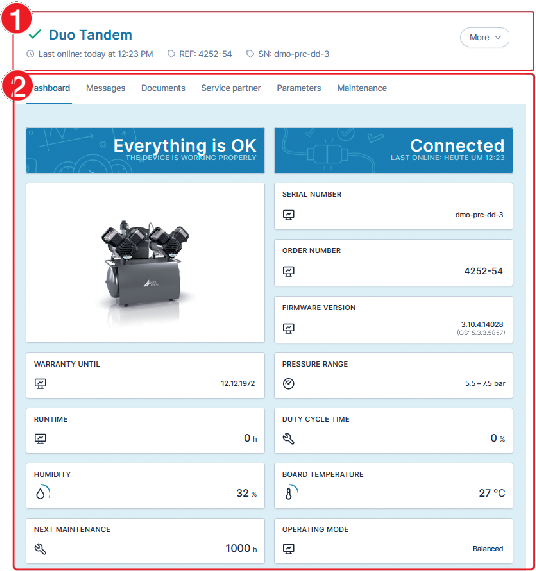
En las Informaciones básicas del dispositivo se visualiza el estado del dispositivo, la identificación del producto, el número de referencia y el número de serie del dispositivo, así como la última vez en que estuvo en línea.
Es posible obtener las siguientes informaciones mediante las Tarjetas de registro:
Panel de control | Vista general del estado actual del aparato y visualización de las informaciones básicas |
Mensajes | Es posible consultar todos los mensajes del dispositivo. Los mensajes están clasificados por tiempo. EN la lista se puede buscar según el código o según el mensaje. |
Documentos | Manuales e informaciones adicionales disponibles en el centro de descargas en duerrdental.com (para socio de servicio adicionalmente duerrdental.net) |
Socio de servicio | Es posible asignar el dispositivo al socio de servicio. |
Parámetros | Parámetros del aparato que pueden ser consultados o configurados (dependiendo del rol del usuario, p.ej. admin) |
Mantenimiento | Lista de los trabajos de mantenimiento con indicación del vencimiento y los repuestos necesarios |
Otros ajustes del aparato pueden realizarse mediante al tecla virtual Más:
Registro del producto 2+1 | Registrar este dispositivo en Dürr Dental, para solicitar una prolongación de la garantía |
Configuración | Configurar el lugar de montaje del aparato |
Quitar el aparato Al conectar el aparato nuevamente a la red, se lo añade automáticamente a la lista de aparatos. |
Escáneres de placas radiográficas solo transmiten los datos de los aparatos (p.ej. Mensaje, informaciones de mantenimiento) al monitor VS. No se transmitirán datos de imágenes o de pacientes.
Para ajustar el escáner de placas radiográficas o los parámetros de tomas, se necesita el software de visualización.
La tarjeta de registro Cuadro de mandos presenta una vista general acerca del estado actual del aparato
Adicionalmente, se visualizan aquí informaciones básicas como, p.ej. número de pedido, número de serie, versión de firmware, garantía.
Dependiendo del aparato, se indican los parámetros actuales y el tiempo hasta el siguiente mantenimiento.
La vista detallada Mensajes indica los mensajes registrados del aparato. Los mensajes se diferencian en las siguientes categorías:
| Avería p. ej.: fallo en un compresor |
| Atención p.ej. Recipiente de amalgama 95% lleno |
 | Observación p. ej.: se requiere cambio de filtro |
 | Información p. ej.: próximo mantenimiento en 30 días |
Si en un aparato se visualiza el mensaje de la categoría Fallo o Atención, se visualizará el mensaje bajo Mis aparatos en la superficie de usuario basada en la nube. En la lista de dispositivos cambia el símbolo.
El notificador visualiza una recomendación con una burbuja y se añade un símbolo en la barra de tareas, incluyendo el color del nivel del mensaje (p.ej. ). Si se presentan varios mensajes, se mostrará el color del mensaje más alto correspondiente.
Informaciones adicionales disponibles en el aparato (p.ej. Manuales como PDF o vídeo) se encuentran en el sector de detalles bajo Documentos.
El socio de servicio obtendrá la visualización de todos los documentos que también constan en el portal duerrdental.net acerca de este aparato.
Si se necesitan los documentos con mayor frecuencia, es posible añadirlos a los documentos archivados en la barra de navegación.
 .
. .
.En la tarjeta de registro Parámetros pueden consultarse los parámetros configurados del aparato. Si el usuario cuenta con los derechos necesarios, puede modificar los parámetros del aparato.
En dispositivos de diagnósticos solo se podrán modificar parámetros directamente en el aparato o mediante el software de visualización de imágenes.
El sistema envía la modificación al aparato. Tan pronto el parámetro cambió en el aparato, se visualizará un mensaje en el software.
Si no se ha finalizado la modificación en el aparato, no será posible realizar otras modificaciones en el software.
En la tarjeta de registro Mantenimiento se visualizan los trabajos regulares de mantenimiento.
En caso de tener que realizar un mantenimiento, se resalta el jinete Mantenimiento con . Adicionalmente se envía un email (véase también Registrar contactos para notificaciones).
Los trabajos de mantenimiento están clasificados según su vencimiento y pueden ser desplegadas y replegadas.
Pulsando en Visualizar repuestos, se visualiza la lista de los repuestos necesarios para los trabajos de mantenimiento.
En caso de haber realizado un trabajo de mantenimiento, este puede ser confirmado por el administrado r o el técnico.
Mis aparatos y cambiar al jinete Mantenimiento. .
. Se cierra el cuadro de diálogo. Se resetea el intervalo de mantenimiento.
En el historial del aparato se visualizan los trabajos de mantenimiento realizados.
Mis aparatos y cambiar al jinete Mantenimiento.Se accede al historial del aparato.
Por motivos legales, los parámetros para la esterilización solo podrán ser configurados en el aparato y no mediante el VS Monitor.
En el caso de Hygoclave 50, todos los protocolos de esterilización, nuevos y existentes en el aparato serán archivadas automáticamente en el ordenador local, en el que se encuentre la instalación del servidor en la red local.
Para cada aparato (número de serie), los protocolos serán registrados en el siguiente registro:
C:\Documentos\Dürr Dental\[número de serie]\[año]\[mes]
Las informaciones y los ajustes del usuario registrado se encuentran en el borde inferior de la barra de navegación.
Al pulsar en el usuario registrado, se abre un menú de contexto con diferentes funciones:
 | Mi cuenta de usuario:
|
 | Cambiar el idioma |
 | Abrir ayuda |
 | Acceder a las indicaciones legales de las condiciones comerciales |
 | Acceder a la declaración de protección de datos |
 | Dar de baja al usuario |
Usando VS Monitor, socios de servicio obtendrán una vista general acerca del estado de los aparatos asignados por diferentes clínicas.
A través de la superficie de mando basada en la nube se podrán consultar también todos los trabajos de mantenimiento pendientes.
El socio de servicio debe registrarse en Dürr Dental.
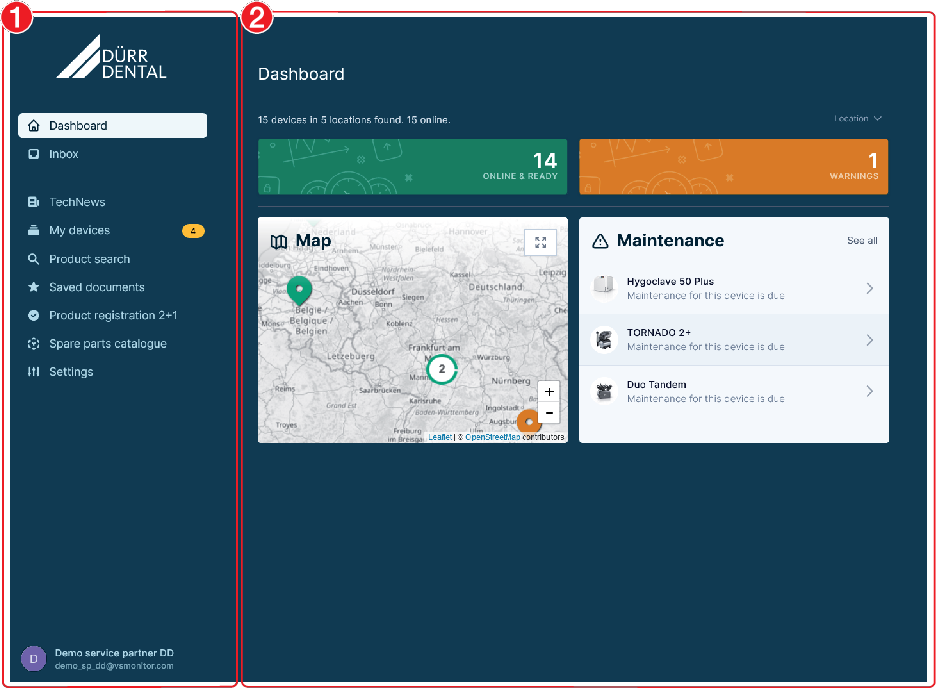
La superficie del operador de la nube consiste de la barra de navegación y el contenido.
La zona de contenido depende de la vista seleccionada en la barra de navegación.
En la barra de navegación pueden seleccionarse diferentes visualizaciones, dependiendo del rol del usuario registrado:
| Panel de control | Página inicial, vista general del estado de los aparatos y de los lugares El sector Mantenimientos solo se visualiza si hay algún mantenimiento pendiente. |
| Entrada de correo | Indicaciones para el socio de servicio:
|
 | TechNews | Informaciones actuales de Dürr Dental |
| Mis dispositivos | Presenta informaciones de todos los dispositivos existentes en la red local. En caso de que algún aparato esté en estado Fallo, Atención o Aviso, se visualiza la cantidad de estos aparatos en la barra de navegación. El color asignado indica el máximo nivel de mensaje surgido. Ver también Mis dispositivos |
| Búsqueda de productos | Búsqueda de informaciones acerca de productos de Dürr Dental a partir del número de serie, del nombre del producto o del número de pedido. Mediante la aplicación se puede escanear también la placa de características para facilitar la búsqueda. |
| Documentos archivados | Documentos marcados como favoritos |
| Registro del producto 2+1 | Registrar un nuevo dispositivo en Dürr Dental, para solicitar una prolongación de la garantía. |
 | Catálogo de recambios | Enlace con el catálogo de repuestos Dürr Dental, se abre una nueva ventana en el navegador |
| Configuración | Crear y editar lugares de instalación, usuarios y notificaciones |
Al momento del primer registro en la nube, el navegador ofrece aceptar notificaciones de esta página web. Con ello se visualizarán notificaciones de escritorio en VS Monitor, si el navegador está activado en este ordenador. No es necesario tener abierta la página web de VS Monitor.
Las notificaciones pueden ser activadas/desactivadas en cualquier momento mediante las configuraciones del navegador.
Existen diferentes tipos de lugares para la estructura de organización:
| Lugar de instalación principal Lugar de instalación automáticamente generado. Es posible editar o modificar el nombre pero no es posible borrarlo. Aquí se administran a los miembros (usuarios), véase también Administrar miembros. |
 | Región Lugar de instalación sin dirección para el agrupamiento de lugares de instalación |
 | Lugar de instalación con dirección Si la dirección consta en por lo menos un lugar, se los visualizará en el mapa en |
El socio de servicio automáticamente recibe un lugar de instalación .
Si una clínica asignó aparatos al socio de servicio y estos han sido confirmados por el socio de servicio, en la organización del socio de servicio: se visualizará la clínica como lugar .
Para una mejor vista general se pueden resumir los lugares de instalación como Regiones y lugares. Para cada lugar se pueden configurar notificaciones individuales (véase también Registrar contactos para notificaciones).
Ejemplo de una estructura de organización:
| ||
| ||
| ||
| ||
| ||
| ||
| ||
| ||
Ajustes.Se visualizan los lugares de instalación existentes.
Se abre el cuadro de diálogo.
En caso de ingresar un solo nombre, se generará una región.
Con la dirección se fijará un lugar.
Se abre el cuadro de diálogo.
Solo es posible borrar un lugar si no se asignaron dispositivos o lugares en posiciones de orden subordinado. Antes de borrar, es necesario retirar todos los dispositivos o lugares.
No se puede borrar el lugar principal de instalación.
Se abre el cuadro de diálogo.
.Miembros son usuarios que tienen acceso a la organización en el monitor VS. Solo es posible añadir a un usuario al lugar principal.
Hay diferentes roles con distintos derechos de acceso:
Función | Derechos de acceso |
|---|---|
Miembro | Consultar la información del aparato |
Administrador | Administrar lugares de instalación Administrar miembros Administrar los aparatos Configurar los parámetros de los aparatos |
Técnico | Configurar parámetros del aparato (ampliado) |
Ajustes.Se visualizan los lugares de instalación existentes.
El nuevo miembro obtendrá una invitación por email que incluye el acceso a la superficie del usuario.
junto al miembro. Cambiar rol. junto al miembro. Borrar.Si en un aparato se visualiza un mensaje importante (fallo), el software informa automáticamente a los contactos registrados en Notificaciones.
Notificaciones pueden registrarse en todos los niveles de la organización. En caso de visualizar un contacto de notificación de color gris, el contacto de notificación está registrado en un lugar de orden superior.
Ajustes.Se visualizan los lugares de instalación existentes.
Se envía un primer email. Confirmar las notificaciones del VS Monitor mediante el enlace enviado al email.
junto al registro. Borrar.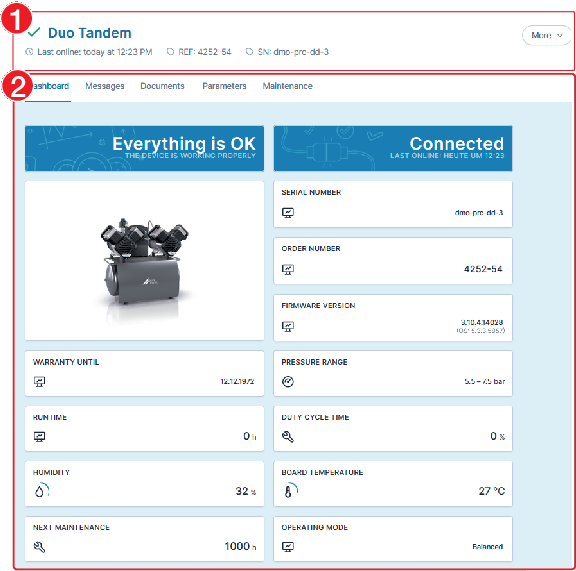
En las Informaciones básicas del dispositivo se visualiza el estado del dispositivo, la identificación del producto, el número de referencia y el número de serie del dispositivo, así como la última vez en que estuvo en línea.
Es posible obtener las siguientes informaciones mediante las Tarjetas de registro:
Panel de control | Vista general del estado actual del aparato y visualización de las informaciones básicas, véase Panel de mando |
Mensajes | Es posible consultar todos los mensajes del dispositivo, véase Consultar mensajes actuales. Los mensajes están clasificados por tiempo. EN la lista se puede buscar según el código o según el mensaje. |
Documentos | Manuales e informaciones adicionales disponibles en el centro de descargas en duerrdental.com y duerrdental.net, véase Visualizar los documentos del aparato |
Parámetros | Parámetros del aparato que pueden ser consultados o configurados (dependiendo del rol del usuario, p.ej. Admin), véase Ajustar los parámetros de los aparatos |
Mantenimiento | Lista de los trabajos de mantenimiento con indicación del vencimiento y los repuestos necesarios, véase Mantenimiento |
Otros ajustes del aparato pueden realizarse mediante al tecla virtual Más:
Registro del producto 2+1 | Registrar este dispositivo en Dürr Dental, para solicitar una prolongación de la garantía |
Catálogo de recambios | Enlace de los repuestos del aparato en el catálogo de repuestos |
Configuración | Quitar el aparato Al conectar el aparato nuevamente a la red, se lo añade automáticamente a la lista de aparatos. |
Los trabajos de reparación que excedan de lo exigido para los trabajos de mantenimiento corrientes, solamente deberán ser llevados a cabo por un técnico capacitado o por nuestro servicio de asistencia técnica.
Error | Posible causa | Eliminación |
|---|---|---|
El aparato no se muestra en la lista de aparatos | Aparato no conectado a la red |
|
Ajustes del cortafuegos no correctos |
| |
Ajustes de red erróneos en el Panel de control |
| |
Aparato o firmware obsoleto del dispositivo no es apoyado | Si el dispositivo es apoyado:
| |
El usuario no está registrado mediante el notificador en VS Monitor. |
| |
Configuración errónea de a red |
| |
Si no se actualiza el estado del dispositivo, no se visualizan los mensajes | Interrumpida la conexión con el aparato |
|
Se detiene el servicio VistaSoft Monitor en el ordenador (instalación de servidor) |
| |
Conexión a Internet interrumpida |
| |
El usuario no está registrado mediante el notificador en VistaSoft Monitor. |
| |
Informaciones limitadas al panel de control del aparato | La versión de firmware del aparato ha caducado |
|
Sin indicación de estado en lectores de placas radiográficas en VS Monitor | Instalación de VS Monitor y VistaSoft no se encuentran en el mismo ordenador o la versión es errónea |
|
Partes del producto basadas en bibliotecas de terceros con una gran variedad de licencias libres que no están cubiertas por el EULA.
Qt framework (LGPL-3)
jwcrypto (LGPL-3)
pycountry (LGPL-2)
Apache License
Version 2.0, January 2004
http://www.apache.org/licenses/
TERMS AND CONDITIONS FOR USE, REPRODUCTION, AND DISTRIBUTION
1. Definitions.
"License" shall mean the terms and conditions for use, reproduction, and distribution as defined by Sections 1 through 9 of this document.
"Licensor" shall mean the copyright owner or entity authorized by the copyright owner that is granting the License.
"Legal Entity" shall mean the union of the acting entity and all other entities that control, are controlled by, or are under common control with that entity. For the purposes of this definition, "control" means (i) the power, direct or indirect, to cause the direction or management of such entity, whether by contract or otherwise, or (ii) ownership of fifty percent (50%) or more of the outstanding shares, or (iii) beneficial ownership of such entity.
"You" (or "Your") shall mean an individual or Legal Entity exercising permissions granted by this License.
"Source" form shall mean the preferred form for making modifications, including but not limited to software source code, documentation source, and configuration files.
"Object" form shall mean any form resulting from mechanical transformation or translation of a Source form, including but not limited to compiled object code, generated documentation, and conversions to other media types.
"Work" shall mean the work of authorship, whether in Source or Object form, made available under the License, as indicated by a copyright notice that is included in or attached to the work (an example is provided in the Appendix below).
"Derivative Works" shall mean any work, whether in Source or Object form, that is based on (or derived from) the Work and for which the editorial revisions, annotations, elaborations, or other modifications represent, as a whole, an original work of authorship. For the purposes of this License, Derivative Works shall not include works that remain separable from, or merely link (or bind by name) to the interfaces of, the Work and Derivative Works thereof.
"Contribution" shall mean any work of authorship, including the original version of the Work and any modifications or additions to that Work or Derivative Works thereof, that is intentionally submitted to Licensor for inclusion in the Work by the copyright owner or by an individual or Legal Entity authorized to submit on behalf of the copyright owner. For the purposes of this definition, "submitted" means any form of electronic, verbal, or written communication sent to the Licensor or its representatives, including but not limited to communication on electronic mailing lists, source code control systems, and issue tracking systems that are managed by, or on behalf of, the Licensor for the purpose of discussing and improving the Work, but excluding communication that is conspicuously marked or otherwise designated in writing by the copyright owner as "Not a Contribution."
"Contributor" shall mean Licensor and any individual or Legal Entity on behalf of whom a Contribution has been received by Licensor and subsequently incorporated within the Work.
2. Grant of Copyright License. Subject to the terms and conditions of this License, each Contributor hereby grants to You a perpetual, worldwide, non-exclusive, no-charge, royalty-free, irrevocable copyright license to reproduce, prepare Derivative Works of, publicly display, publicly perform, sublicense, and distribute the Work and such Derivative Works in Source or Object form.
3. Grant of Patent License. Subject to the terms and conditions of this License, each Contributor hereby grants to You a perpetual, worldwide, non-exclusive, no-charge, royalty-free, irrevocable (except as stated in this section) patent license to make, have made, use, offer to sell, sell, import, and otherwise transfer the Work, where such license applies only to those patent claims licensable by such Contributor that are necessarily infringed by their Contribution(s) alone or by combination of their Contribution(s) with the Work to which such Contribution(s) was submitted. If You institute patent litigation against any entity (including a cross-claim or counterclaim in a lawsuit) alleging that the Work or a Contribution incorporated within the Work constitutes direct or contributory patent infringement, then any patent licenses granted to You under this License for that Work shall terminate as of the date such litigation is filed.
4. Redistribution. You may reproduce and distribute copies of the Work or Derivative Works thereof in any medium, with or without modifications, and in Source or Object form, provided that You meet the following conditions:
(a) You must give any other recipients of the Work or Derivative Works a copy of this License; and
(b) You must cause any modified files to carry prominent notices stating that You changed the files; and
(c) You must retain, in the Source form of any Derivative Works that You distribute, all copyright, patent, trademark, and attribution notices from the Source form of the Work, excluding those notices that do not pertain to any part of the Derivative Works; and
(d) If the Work includes a "NOTICE" text file as part of its distribution, then any Derivative Works that You distribute must include a readable copy of the attribution notices contained within such NOTICE file, excluding those notices that do not pertain to any part of the Derivative Works, in at least one of the following places: within a NOTICE text file distributed as part of the Derivative Works; within the Source form or documentation, if provided along with the Derivative Works; or, within a display generated by the Derivative Works, if and wherever such third-party notices normally appear. The contents of the NOTICE file are for informational purposes only and do not modify the License. You may add Your own attribution notices within Derivative Works that You distribute, alongside or as an addendum to the NOTICE text from the Work, provided that such additional attribution notices cannot be construed as modifying the License.
You may add Your own copyright statement to Your modifications and may provide additional or different license terms and conditions for use, reproduction, or distribution of Your modifications, or for any such Derivative Works as a whole, provided Your use, reproduction, and distribution of the Work otherwise complies with the conditions stated in this License.
5. Submission of Contributions. Unless You explicitly state otherwise, any Contribution intentionally submitted for inclusion in the Work by You to the Licensor shall be under the terms and conditions of this License, without any additional terms or conditions. Notwithstanding the above, nothing herein shall supersede or modify the terms of any separate license agreement you may have executed with Licensor regarding such Contributions.
6. Trademarks. This License does not grant permission to use the trade names, trademarks, service marks, or product names of the Licensor, except as required for reasonable and customary use in describing the origin of the Work and reproducing the content of the NOTICE file.
7. Disclaimer of Warranty. Unless required by applicable law or agreed to in writing, Licensor provides the Work (and each Contributor provides its Contributions) on an "AS IS" BASIS, WITHOUT WARRANTIES OR CONDITIONS OF ANY KIND, either express or implied, including, without limitation, any warranties or conditions of TITLE, NON-INFRINGEMENT, MERCHANTABILITY, or FITNESS FOR A PARTICULAR PURPOSE. You are solely responsible for determining the appropriateness of using or redistributing the Work and assume any risks associated with Your exercise of permissions under this License.
8. Limitation of Liability. In no event and under no legal theory, whether in tort (including negligence), contract, or otherwise, unless required by applicable law (such as deliberate and grossly negligent acts) or agreed to in writing, shall any Contributor be liable to You for damages, including any direct, indirect, special, incidental, or consequential damages of any character arising as a result of this License or out of the use or inability to use the Work (including but not limited to damages for loss of goodwill, work stoppage, computer failure or malfunction, or any and all other commercial damages or losses), even if such Contributor has been advised of the possibility of such damages.
9. Accepting Warranty or Additional Liability. While redistributing the Work or Derivative Works thereof, You may choose to offer, and charge a fee for, acceptance of support, warranty, indemnity, or other liability obligations and/or rights consistent with this License. However, in accepting such obligations, You may act only on Your own behalf and on Your sole responsibility, not on behalf of any other Contributor, and only if You agree to indemnify, defend, and hold each Contributor harmless for any liability incurred by, or claims asserted against, such Contributor by reason of your accepting any such warranty or additional liability.
END OF TERMS AND CONDITIONS
Permission is hereby granted, free of charge, to any person obtaining a copy of this software and associated documentation files (the "Software"), to deal in the Software without restriction, including without limitation the rights to use, copy, modify, merge, publish, distribute, sublicense, and/or sell copies of the Software, and to permit persons to whom the Software is furnished to do so, subject to the following conditions:
The above copyright notice and this permission notice shall be included in all copies or substantial portions of the Software.
THE SOFTWARE IS PROVIDED "AS IS", WITHOUT WARRANTY OF ANY KIND, EXPRESS OR IMPLIED, INCLUDING BUT NOT LIMITED TO THE WARRANTIES OF MERCHANTABILITY, FITNESS FOR A PARTICULAR PURPOSE AND NONINFRINGEMENT. IN NO EVENT SHALL THE AUTHORS OR COPYRIGHT HOLDERS BE LIABLE FOR ANY CLAIM, DAMAGES OR OTHER LIABILITY, WHETHER IN AN ACTION OF CONTRACT, TORT OR OTHERWISE, ARISING FROM, OUT OF OR IN CONNECTION WITH THE SOFTWARE OR THE USE OR OTHER DEALINGS IN THE SOFTWARE.
Redistribution and use in source and binary forms, with or without modification, are permitted provided that the following conditions are met:
1. Redistributions of source code must retain the above copyright notice, this list of conditions and the following disclaimer.
2. Redistributions in binary form must reproduce the above copyright notice, this list of conditions and the following disclaimer in the documentation and/or other materials provided with the distribution.
3. Neither the name of the copyright holder nor the names of its contributors may be used to endorse or promote products derived from this software without specific prior written permission.
THIS SOFTWARE IS PROVIDED BY THE COPYRIGHT HOLDERS AND CONTRIBUTORS "AS IS" AND ANY EXPRESS OR IMPLIED WARRANTIES, INCLUDING, BUT NOT LIMITED TO, THE IMPLIED WARRANTIES OF MERCHANTABILITY AND FITNESS FOR A PARTICULAR PURPOSE ARE DISCLAIMED. IN NO EVENT SHALL THE COPYRIGHT HOLDER OR CONTRIBUTORS BE LIABLE FOR ANY DIRECT, INDIRECT, INCIDENTAL, SPECIAL, EXEMPLARY, OR CONSEQUENTIAL DAMAGES (INCLUDING, BUT NOT LIMITED TO, PROCUREMENT OF SUBSTITUTE GOODS OR SERVICES; LOSS OF USE, DATA, OR PROFITS; OR BUSINESS INTERRUPTION) HOWEVER CAUSED AND ON ANY THEORY OF LIABILITY, WHETHER IN CONTRACT, STRICT LIABILITY, OR TORT (INCLUDING NEGLIGENCE OR OTHERWISE) ARISING IN ANY WAY OUT OF THE USE OF THIS SOFTWARE, EVEN IF ADVISED OF THE POSSIBILITY OF SUCH DAMAGE.
Permission to use, copy, modify, and/or distribute this software for any purpose with or without fee is hereby granted, provided that the above copyright notice and this permission notice appear in all copies.
THE SOFTWARE IS PROVIDED “AS IS” AND THE AUTHOR DISCLAIMS ALL WARRANTIES WITH REGARD TO THIS SOFTWARE INCLUDING ALL IMPLIED WARRANTIES OF MERCHANTABILITY AND FITNESS. IN NO EVENT SHALL THE AUTHOR BE LIABLE FOR ANY SPECIAL, DIRECT, INDIRECT, OR CONSEQUENTIAL DAMAGES OR ANY DAMAGES WHATSOEVER RESULTING FROM LOSS OF USE, DATA OR PROFITS, WHETHER IN AN ACTION OF CONTRACT, NEGLIGENCE OR OTHER TORTIOUS ACTION, ARISING OUT OF OR IN CONNECTION WITH THE USE OR PERFORMANCE OF THIS SOFTWARE.
Mozilla Public License
Version 2.0
This license applies to the following redistributed libraries and files:The above copyright notice and this permission notice shall be included in all copies or substantial portions of the Software.
1. Definitions
1.1. “Contributor”means each individual or legal entity that creates, contributes to the creation of, or owns Covered Software.
1.2. “Contributor Version”means the combination of the Contributions of others (if any) used by a Contributor and that particular Contributor’s Contribution.
1.3. “Contribution”means Covered Software of a particular Contributor.
1.4. “Covered Software”means Source Code Form to which the initial Contributor has attached the notice in Exhibit A, the Executable Form of such Source Code Form, and Modifications of such Source Code Form, in each case including portions thereof.
1.5. “Incompatible With Secondary Licenses”meansthat the initial Contributor has attached the notice described in Exhibit B to the Covered Software; orthat the Covered Software was made available under the terms of version 1.1 or earlier of the License, but not also under the terms of a Secondary License.
1.6. “Executable Form”means any form of the work other than Source Code Form.
1.7. “Larger Work”means a work that combines Covered Software with other material, in a separate file or files, that is not Covered Software.
1.8. “License”means this document.
1.9. “Licensable”means having the right to grant, to the maximum extent possible, whether at the time of the initial grant or subsequently, any and all of the rights conveyed by this License.
1.10. “Modifications”means any of the following:any file in Source Code Form that results from an addition to, deletion from, or modification of the contents of Covered Software; orany new file in Source Code Form that contains any Covered Software.
1.11. “Patent Claims” of a Contributormeans any patent claim(s), including without limitation, method, process, and apparatus claims, in any patent Licensable by such Contributor that would be infringed, but for the grant of the License, by the making, using, selling, offering for sale, having made, import, or transfer of either its Contributions or its Contributor Version.
1.12. “Secondary License”means either the GNU General Public License, Version 2.0, the GNU Lesser General Public License, Version 2.1, the GNU Affero General Public License, Version 3.0, or any later versions of those licenses.
1.13. “Source Code Form”means the form of the work preferred for making modifications.
1.14. “You” (or “Your”)means an individual or a legal entity exercising rights under this License. For legal entities, “You” includes any entity that controls, is controlled by, or is under common control with You. For purposes of this definition, “control” means (a) the power, direct or indirect, to cause the direction or management of such entity, whether by contract or otherwise, or (b) ownership of more than fifty percent (50%) of the outstanding shares or beneficial ownership of such entity.
2. License Grants and Conditions
2.1. Grants
Each Contributor hereby grants You a world-wide, royalty-free, non-exclusive license:
1. under intellectual property rights (other than patent or trademark) Licensable by such Contributor to use, reproduce, make available, modify, display, perform, distribute, and otherwise exploit its Contributions, either on an unmodified basis, with Modifications, or as part of a Larger Work; and
2. under Patent Claims of such Contributor to make, use, sell, offer for sale, have made, import, and otherwise transfer either its Contributions or its Contributor Version.
2.2. Effective Date
The licenses granted in Section 2.1 with respect to any Contribution become effective for each Contribution on the date the Contributor first distributes such Contribution.
2.3. Limitations on Grant Scope
The licenses granted in this Section 2 are the only rights granted under this License. No additional rights or licenses will be implied from the distribution or licensing of Covered Software under this License. Notwithstanding Section 2.1(b) above, no patent license is granted by a Contributor:
1. for any code that a Contributor has removed from Covered Software; or
2. for infringements caused by: (i) Your and any other third party’s modifications of Covered Software, or (ii) the combination of its Contributions with other software (except as part of its Contributor Version); or
3. under Patent Claims infringed by Covered Software in the absence of its Contributions.
This License does not grant any rights in the trademarks, service marks, or logos of any Contributor (except as may be necessary to comply with the notice requirements in Section 3.4).
2.4. Subsequent Licenses
No Contributor makes additional grants as a result of Your choice to distribute the Covered Software under a subsequent version of this License (see Section 10.2) or under the terms of a Secondary License (if permitted under the terms of Section 3.3).
2.5. Representation
Each Contributor represents that the Contributor believes its Contributions are its original creation(s) or it has sufficient rights to grant the rights to its Contributions conveyed by this License.
2.6. Fair Use
This License is not intended to limit any rights You have under applicable copyright doctrines of fair use, fair dealing, or other equivalents.
2.7. Conditions
Sections 3.1, 3.2, 3.3, and 3.4 are conditions of the licenses granted in Section 2.1.
3. Responsibilities
3.1. Distribution of Source Form
All distribution of Covered Software in Source Code Form, including any Modifications that You create or to which You contribute, must be under the terms of this License. You must inform recipients that the Source Code Form of the Covered Software is governed by the terms of this License, and how they can obtain a copy of this License. You may not attempt to alter or restrict the recipients’ rights in the Source Code Form.
3.2. Distribution of Executable Form
If You distribute Covered Software in Executable Form then:
1. such Covered Software must also be made available in Source Code Form, as described in Section 3.1, and You must inform recipients of the Executable Form how they can obtain a copy of such Source Code Form by reasonable means in a timely manner, at a charge no more than the cost of distribution to the recipient; and
2. You may distribute such Executable Form under the terms of this License, or sublicense it under different terms, provided that the license for the Executable Form does not attempt to limit or alter the recipients’ rights in the Source Code Form under this License.
3.3. Distribution of a Larger Work
You may create and distribute a Larger Work under terms of Your choice, provided that You also comply with the requirements of this License for the Covered Software. If the Larger Work is a combination of Covered Software with a work governed by one or more Secondary Licenses, and the Covered Software is not Incompatible With Secondary Licenses, this License permits You to additionally distribute such Covered Software under the terms of such Secondary License(s), so that the recipient of the Larger Work may, at their option, further distribute the Covered Software under the terms of either this License or such Secondary License(s).
3.4. Notices
You may not remove or alter the substance of any license notices (including copyright notices, patent notices, disclaimers of warranty, or limitations of liability) contained within the Source Code Form of the Covered Software, except that You may alter any license notices to the extent required to remedy known factual inaccuracies.
3.5. Application of Additional Terms
You may choose to offer, and to charge a fee for, warranty, support, indemnity or liability obligations to one or more recipients of Covered Software. However, You may do so only on Your own behalf, and not on behalf of any Contributor. You must make it absolutely clear that any such warranty, support, indemnity, or liability obligation is offered by You alone, and You hereby agree to indemnify every Contributor for any liability incurred by such Contributor as a result of warranty, support, indemnity or liability terms You offer. You may include additional disclaimers of warranty and limitations of liability specific to any jurisdiction.
4. Inability to Comply Due to Statute or Regulation
If it is impossible for You to comply with any of the terms of this License with respect to some or all of the Covered Software due to statute, judicial order, or regulation then You must: (a) comply with the terms of this License to the maximum extent possible; and (b) describe the limitations and the code they affect. Such description must be placed in a text file included with all distributions of the Covered Software under this License. Except to the extent prohibited by statute or regulation, such description must be sufficiently detailed for a recipient of ordinary skill to be able to understand it.
5. Termination
5.1. The rights granted under this License will terminate automatically if You fail to comply with any of its terms. However, if You become compliant, then the rights granted under this License from a particular Contributor are reinstated (a) provisionally, unless and until such Contributor explicitly and finally terminates Your grants, and (b) on an ongoing basis, if such Contributor fails to notify You of the non-compliance by some reasonable means prior to 60 days after You have come back into compliance. Moreover, Your grants from a particular Contributor are reinstated on an ongoing basis if such Contributor notifies You of the non-compliance by some reasonable means, this is the first time You have received notice of non-compliance with this License from such Contributor, and You become compliant prior to 30 days after Your receipt of the notice.
5.2. If You initiate litigation against any entity by asserting a patent infringement claim (excluding declaratory judgment actions, counter-claims, and cross-claims) alleging that a Contributor Version directly or indirectly infringes any patent, then the rights granted to You by any and all Contributors for the Covered Software under Section 2.1 of this License shall terminate.
5.3. In the event of termination under Sections 5.1 or 5.2 above, all end user license agreements (excluding distributors and resellers) which have been validly granted by You or Your distributors under this License prior to termination shall survive termination.
6. Disclaimer of Warranty
Covered Software is provided under this License on an “as is” basis, without warranty of any kind, either expressed, implied, or statutory, including, without limitation, warranties that the Covered Software is free of defects, merchantable, fit for a particular purpose or non-infringing. The entire risk as to the quality and performance of the Covered Software is with You. Should any Covered Software prove defective in any respect, You (not any Contributor) assume the cost of any necessary servicing, repair, or correction. This disclaimer of warranty constitutes an essential part of this License. No use of any Covered Software is authorized under this License except under this disclaimer.
7. Limitation of Liability
Under no circumstances and under no legal theory, whether tort (including negligence), contract, or otherwise, shall any Contributor, or anyone who distributes Covered Software as permitted above, be liable to You for any direct, indirect, special, incidental, or consequential damages of any character including, without limitation, damages for lost profits, loss of goodwill, work stoppage, computer failure or malfunction, or any and all other commercial damages or losses, even if such party shall have been informed of the possibility of such damages. This limitation of liability shall not apply to liability for death or personal injury resulting from such party’s negligence to the extent applicable law prohibits such limitation. Some jurisdictions do not allow the exclusion or limitation of incidental or consequential damages, so this exclusion and limitation may not apply to You.
8. Litigation
Any litigation relating to this License may be brought only in the courts of a jurisdiction where the defendant maintains its principal place of business and such litigation shall be governed by laws of that jurisdiction, without reference to its conflict-of-law provisions. Nothing in this Section shall prevent a party’s ability to bring cross-claims or counter-claims.
9. Miscellaneous
This License represents the complete agreement concerning the subject matter hereof. If any provision of this License is held to be unenforceable, such provision shall be reformed only to the extent necessary to make it enforceable. Any law or regulation which provides that the language of a contract shall be construed against the drafter shall not be used to construe this License against a Contributor.
10. Versions of the License
10.1. New Versions
Mozilla Foundation is the license steward. Except as provided in Section 10.3, no one other than the license steward has the right to modify or publish new versions of this License. Each version will be given a distinguishing version number.
10.2. Effect of New Versions
You may distribute the Covered Software under the terms of the version of the License under which You originally received the Covered Software, or under the terms of any subsequent version published by the license steward.
10.3. Modified Versions
If you create software not governed by this License, and you want to create a new license for such software, you may create and use a modified version of this License if you rename the license and remove any references to the name of the license steward (except to note that such modified license differs from this License).
10.4. Distributing Source Code Form that is Incompatible With Secondary Licenses
If You choose to distribute Source Code Form that is Incompatible With Secondary Licenses under the terms of this version of the License, the notice described in Exhibit B of this License must be attached.
Exhibit A - Source Code Form License Notice
This Source Code Form is subject to the terms of the Mozilla Public License, v. 2.0. If a copy of the MPL was not distributed with this file, You can obtain one at https://mozilla.org/MPL/2.0/.
If it is not possible or desirable to put the notice in a particular file, then You may include the notice in a location (such as a LICENSE file in a relevant directory) where a recipient would be likely to look for such a notice.
 |
Hersteller / Manufacturer: |
DÜRR DENTAL SE Höpfigheimer Str. 17 74321 Bietigheim-Bissingen Germany Fon: +49 7142 705-0 www.duerrdental.com info@duerrdental.com |